

What if the best AI video tool isn’t the one that creates the most impressive first clip, but the one that gets you to a publish-ready video with less rework? Choosing an ai text to video generator can feel difficult when platforms promise similar results but offer different levels of editing control, voiceover support, and publishing features.
Look beyond the demo. Automated visuals and narration need to fit your brand, and a quick generation won’t save time if every scene needs rebuilding before it’s ready to share. The right tool should turn written ideas into video while giving you practical ways to review, refine, and prepare each piece for its audience.
This guide compares the capabilities that matter, explains how text-to-video tools differ from broader creative suites, and helps you assess workflow fit before subscribing. You’ll learn what to check in output quality, editing control, templates, multilingual voiceovers, and social publishing, so you can choose with confidence and create for short-form platforms and audiences across languages.
Key Takeaways
- Text-to-video tools vary in how they create visuals, so identify whether you need generated scenes, assembled media, or a structured video from a script.
- Choose an ai text to video generator by testing the full workflow, from your source material and scene controls to editing, voiceovers, captions, and export.
- Match the platform to your publishing rhythm: occasional videos and recurring social content can call for different workflows.
- Run a realistic project before subscribing, then assess draft quality, revision effort, narration, and publishing steps together.
- Templates, editing tools, multilingual voiceovers, and social publishing can all support a repeatable creation workflow.
What AI Text to Video Generators Can and Cannot Do
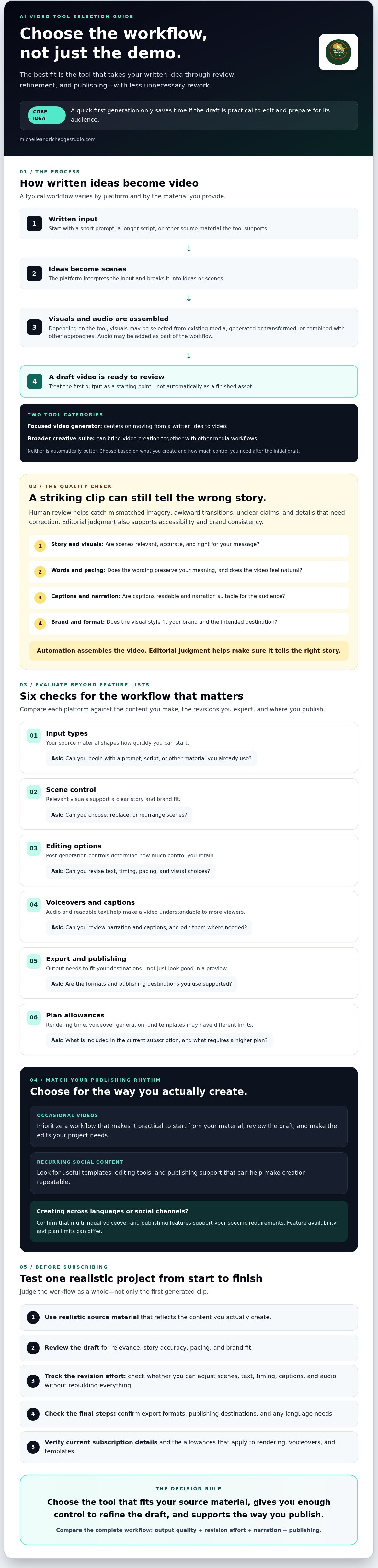
An ai text to video generator turns written input, such as a prompt or script, into a draft video through automated media selection, scene generation, or a combination of both. The term covers different workflows: one tool might match a script with existing media, while another creates or transforms visual scenes based on instructions. Don’t assume every platform makes original footage or follows the same production steps.
How does text-to-video generation turn words into scenes?
A typical workflow interprets written input, breaks it into ideas or scenes, creates or selects visuals, adds audio, and assembles a draft. The exact process depends on the tool and what you provide. Some platforms start with a short prompt; others work from a longer script or additional source material. For a prominent example of the technology, OpenAI's Sora model illustrates how text prompts can guide generated video, while also highlighting that model capabilities and limitations vary.
That difference matters when choosing between a focused video generator and a broader creative suite. A focused tool may center on moving from written idea to video, while a suite can bring video creation together with other media workflows. Neither category is automatically the better fit. Choose according to what you need to create and how much control you want after the initial draft.
What should creators expect from an AI-generated first draft?
Expect a starting point, not a finished asset. Review each scene for relevance and story accuracy: a visually striking shot can still misrepresent the message. Check that the wording preserves your intended meaning, the pacing feels natural, captions are readable, and narration suits the audience. Then assess whether the visual style fits your brand and the video works in its intended format.
Automation can assemble the video; editorial judgement makes sure it tells the right story. Human review is essential for catching mismatched imagery, awkward transitions, unclear claims, or details that need correction. It also helps protect accessibility and brand consistency, two needs a generated draft may not understand on its own.
Use the first output to identify what needs refining, not as proof that the tool has failed. If you can adjust scenes, text, timing, captions, or audio, you can shape the draft into something more useful. If those controls are limited, account for the extra work when comparing tools. The next step is to assess how well each tool’s controls and outputs support your real content workflow.
Evaluating AI Text to Video Beyond Feature Lists
A long feature list can look impressive and still leave you with a slow, fragmented process. Compare each ai text to video generator against the content you actually make, the revisions you expect, and the channels where you publish. Use these questions to focus your evaluation:
| Criteria | Why it matters | What to ask |
|---|---|---|
| Input types | Your source material shapes how quickly you can start. | Can you begin with a prompt, script, or other material you already use? |
| Scene control | Relevant visuals support a clear story and brand fit. | Can you choose, replace, or rearrange scenes? |
| Editing options | Post-generation changes determine how much control you retain. | Can you revise text, timing, pacing, and visual choices? |
| Voiceovers and captions | Audio and readable text help make a video understandable to more viewers. | Can you review narration and captions, and edit them where needed? |
| Export and publishing | Output needs to fit your actual destinations, not just look good in a preview. | Are the formats and publishing destinations you use supported? |
| Plan allowances | Rendering time, voiceover generation, and templates may have different limits. | What’s included in the current subscription, and what requires a higher plan? |
Check current plan details and feature availability before subscribing. Then weigh the workflow as a whole: a tool with fewer features may be a better fit if it gives you the controls and output options your regular content needs. If you create across languages or social channels, confirm that its voiceover and publishing features support your specific requirements.
Which creative controls matter after the video is generated?
Look for ways to revise scenes, wording, and pacing without rebuilding the entire video. Templates can help maintain a consistent structure across recurring content, while editing tools give you room to refine the details. Test a representative project before choosing a paid plan. If realistic visuals are part of your use case, consider the wider implications too. PBS NewsHour discusses the potentially dangerous implications of realistic AI video, including the risk of disinformation.
How should you compare video quality and editing effort?
Review the sample for visual relevance, smooth transitions, readable captions, clear narration, and a coherent story. Note each correction needed before publication, such as replacing a mismatched scene, adjusting timing, or fixing on-screen text. Repeat the test with content similar to what you produce regularly.
The best-looking first draft isn’t necessarily the best tool; the better choice is the one that reaches your publishing standard with manageable review and editing. Treat revision effort as a practical measure of fit, not an afterthought.
Which AI text to video generator fits your content workflow?
Choose a tool by tracing your real process from source material to published video. An ai text to video generator can speed up production, but it won’t remove the need to check the story, refine creative choices, and make sure the finished piece fits its audience. Use this five-step selection process:
- 1. Define the output. Decide what you need to publish, such as a short vertical clip, a product explainer, or a longer video.
- 2. Identify your source. Start with the material you actually have: a brief idea, a finished script, an article, or another source.
- 3. Assess creative control. Check whether you can revise scenes, wording, pacing, captions, and audio to suit your standards.
- 4. Test the workflow. Make a representative video and track how much review and editing it takes to reach a publishable result.
- 5. Review plan fit. Confirm current allowances for rendering, voiceover generation, and templates, along with the destinations and features included.
Occasional creators may value a straightforward path to producing one polished video. A creator publishing regularly across social platforms may need repeatable templates, manageable editing, suitable exports, and fewer handoffs between creation and publishing. Match the tool to your actual rhythm, not an imagined future workload.
How do you match a generator to your source material?
Test the input you use most. A short idea, finished script, and article are different starting points, and a platform may not accept or handle each one in the same way. Confirm supported inputs rather than assuming the tool can convert your source directly. Then create one clear test project using typical material. A practical sample reveals more than a feature list or hypothetical comparison.
How do publishing goals change the right tool choice?
Start with your main destination, whether that’s TikTok, Instagram Reels, YouTube Shorts, or another channel. Check the aspect ratio, caption readability, export requirements, and publishing steps for that destination. If you reach multilingual audiences, test voiceover support with a sample in the language you need. Listen for clarity and natural pacing, then check that the translated narration still fits the visuals and message.
Generation can reduce production friction, but it doesn’t make every creative decision for you. Keep time for review, especially when accuracy, brand voice, or accessibility matters. A strong workflow is one you can repeat: it helps you create efficiently while leaving you in control of what your audience sees and hears.
How to Test AI Text to Video Before Subscribing
A convincing demo isn’t enough. Test one project that resembles the content you regularly create, using a typical input, your intended audience, and a real publishing destination. This shows whether an ai text to video generator fits your actual workflow, not just a carefully chosen example.
What should you include in a representative test video?
Choose a normal script or prompt rather than simplifying the task to make the tool look good. If you usually create a short product explainer, test that format with the kind of details and brand language you’d use in a real post. Check whether each visual supports the message and feels appropriate for its audience.
Review the spoken narration for pronunciation, clarity, and pacing. Check captions and on-screen text for accuracy, legibility, and sensible timing. Note where you need to replace a scene, rewrite a line, or adjust the sequence. These corrections reveal whether the platform gives you useful control after generation.
How can you judge whether the workflow saves useful effort?
Track the work from first input to final export, including review and revisions. Use a simple checklist:
- Draft: Does the video communicate the intended idea with relevant visuals?
- Editing: Which scenes, lines, or timing choices need changes, and how straightforward are they to revise?
- Audio and captions: Is narration clear, and do captions match the spoken content?
- Export and publishing: Does the finished file meet your channel’s needs, and are the publishing steps manageable?
- Repeatability: If you publish regularly, can you maintain a consistent standard across more than one draft?
Compare what you observed with your expected publishing frequency. Review the current plan’s allowances for rendering time, voiceover generation, and premium templates, and verify which features and publishing destinations are included. Don’t assume a plan will cover your needs based on a headline feature list. Confirm the details before committing.
A useful test measures more than generation speed. It shows how much human review remains and whether the complete workflow helps you produce work you’re comfortable sharing. M&R Edge Studio’s platform is one option to assess against your test criteria.
Why M&R Edge Studio may suit creators building a repeatable video workflow
Once you’ve tested a tool against your real content and publishing needs, consider how its features work together. M&R Edge Studio combines cinematic video creation from text with templates, editing tools, multilingual voiceovers, and social publishing. That connected workflow may suit creators who want to move from written idea to reviewed video and distribution without treating each step as a separate task.
How does M&R Edge Studio connect creation and distribution?
Start with written input and create a video draft, then use templates and editing tools to shape the result. Add a multilingual voiceover where it supports your audience, review the video, and use the platform’s one-click publishing integration for destinations including TikTok, Instagram Reels, and YouTube Shorts.
This sequence may help creators producing social content repeatedly, but check that the features and destinations you need are available on the subscription tier you’re considering. Export and publishing options matter most when they match your actual channels and review process. Keep the same standards you used during testing: confirm the video’s story, visuals, narration, captions, and final format before it goes live.
Who may benefit from multilingual voiceovers and templates?
Creators addressing audiences in different languages can use voiceovers supported in over 17 languages as part of their video workflow. Test a sample in the language you need, checking pronunciation, pacing, and fit with the visuals. Language availability doesn’t remove the need to review whether the narration sounds right for your content.
Templates offer a starting structure for recurring videos, helping you build a consistent format without beginning from a blank canvas each time. They don’t guarantee originality or brand fit. Adjust the text, scenes, and pacing so each video reflects your message rather than feeling like a reused layout.
M&R Edge Studio serves users in more than 175 countries. That reach may be relevant to creators with international audiences, though you should verify current feature availability and plan allowances for your own account. Subscriptions include recurring allowances for rendering time, voiceover generation, and premium templates, so check the current terms before choosing a plan.
If text-based creation, editing, voiceovers, and social publishing fit the workflow you tested, M&R Edge Studio is an option to consider.
Choose a Workflow That Moves Your Ideas Forward
The right ai text to video generator isn’t simply the one with the longest feature list. It’s the tool that handles your typical source material, gives you enough control to refine the draft, and fits your channels and publishing pace. Test a realistic project, note the review and editing required, and verify current plan allowances before you commit.
M&R Edge Studio brings text-based video creation together with editing tools, templates, multilingual voiceovers in over 17 languages, and one-click publishing to TikTok, Instagram Reels, YouTube Shorts, and other social channels. The company serves users in more than 175 countries, supporting creators who want to reach audiences across regions. Review the available features and plan details against your needs, then decide whether the workflow suits your next video.
Explore M&R Edge Studio and assess its video workflow. Start with one clear idea, shape it with your creative judgement, and keep moving toward videos you’re confident to share.
Frequently Asked Questions
What is an AI text to video generator?
An AI text to video generator turns written input into a video draft through an automated workflow. Depending on the platform, it may select existing media or generate scenes, arrange visuals, and add narration. Results and editing options vary, so check what the specific tool creates before choosing it. Review the draft for accuracy, relevant visuals, pacing, captions, and brand fit before publishing.
How does an AI text to video generator work?
You provide text or another supported source, and the platform uses its own workflow to assemble a video draft. It may organise scenes, match visuals to sections of text, and offer audio or editing options. The steps differ by product. Before settling on a tool, confirm which inputs it accepts, how much control you have over the draft, and what review is needed before export.
Can I use AI-generated videos on TikTok, Instagram Reels, and YouTube Shorts?
Yes, video-generation tools can be part of a workflow for these short-form platforms, but check the tool’s current export and publishing options for each destination. Confirm that the aspect ratio, captions, and audio suit your needs, then review the finished video before posting. Platform rules can change, so check the latest requirements for your intended channel, including whether disclosure or labelling applies.
Will an AI text to video generator create a publish-ready video without editing?
Some drafts may need only light adjustments, while others require substantial review. Check whether the scenes support your message, the pacing feels natural, on-screen text and captions are accurate, and narration and brand details are right. Test a realistic example from your workflow rather than relying on broad speed or quality claims. The editing required for that sample is a more useful measure of fit.
Can an AI text to video generator create videos in multiple languages?
Some platforms offer multilingual voiceovers, but language availability and quality vary. Confirm that the languages you need are supported, then test representative text for pronunciation, naturalness, names, and pacing. Review captions and publishing steps for your target channels as well. M&R Edge Studio states that its platform supports voiceovers in over 17 languages. Check current feature availability and plan details before choosing a subscription.
How should I compare subscription plans for an AI video generator?
Compare each plan’s current allowances for rendering time, voiceover generation, and templates, along with its editing, export, and publishing features. Match those details to how often you expect to create videos and how much revision your workflow requires. Confirm whether billing is monthly or annual and check the provider’s current terms. Don’t choose by feature count alone; test a representative project first.
Is an AI text to video generator suitable for a small creator or team?
It may suit small creators or teams looking for a repeatable way to turn written ideas into video drafts. Templates, editing tools, and voiceovers can support that workflow when they match your needs. The right fit depends on your output, review capacity, language requirements, and plan allowances. Test a typical project, and verify any collaboration or publishing features you expect to use rather than assuming they’re included.